आज के समय में पढ़ाई केवल किताबों और नोट्स तक सीमित नहीं रह गई है। विद्यार्थी अब ऐसे Learning Content को ज्यादा पसंद करते हैं जिसमें उन्हें पढ़ने के साथ-साथ Interact करने, Answer करने और तुरंत अपना Result देखने का मौका मिले।
इसी वजह से अगर आप अपनी वेबसाइट पर सामान्य MCQ Questions की जगह एक Interactive Online Quiz जोड़ना चाहते हैं, तो यह तरीका आपके लिए काफी उपयोगी हो सकता है।
इस आर्टिकल में हम एक ऐसे AI Prompt के बारे में बात कर रहे हैं, जिसकी मदद से History, Geography, Science, Biology, Physics, Chemistry, General Knowledge और Competitive Exams जैसे अलग-अलग विषयों के लिए एक Premium Interactive Quiz तैयार किया जा सकता है।
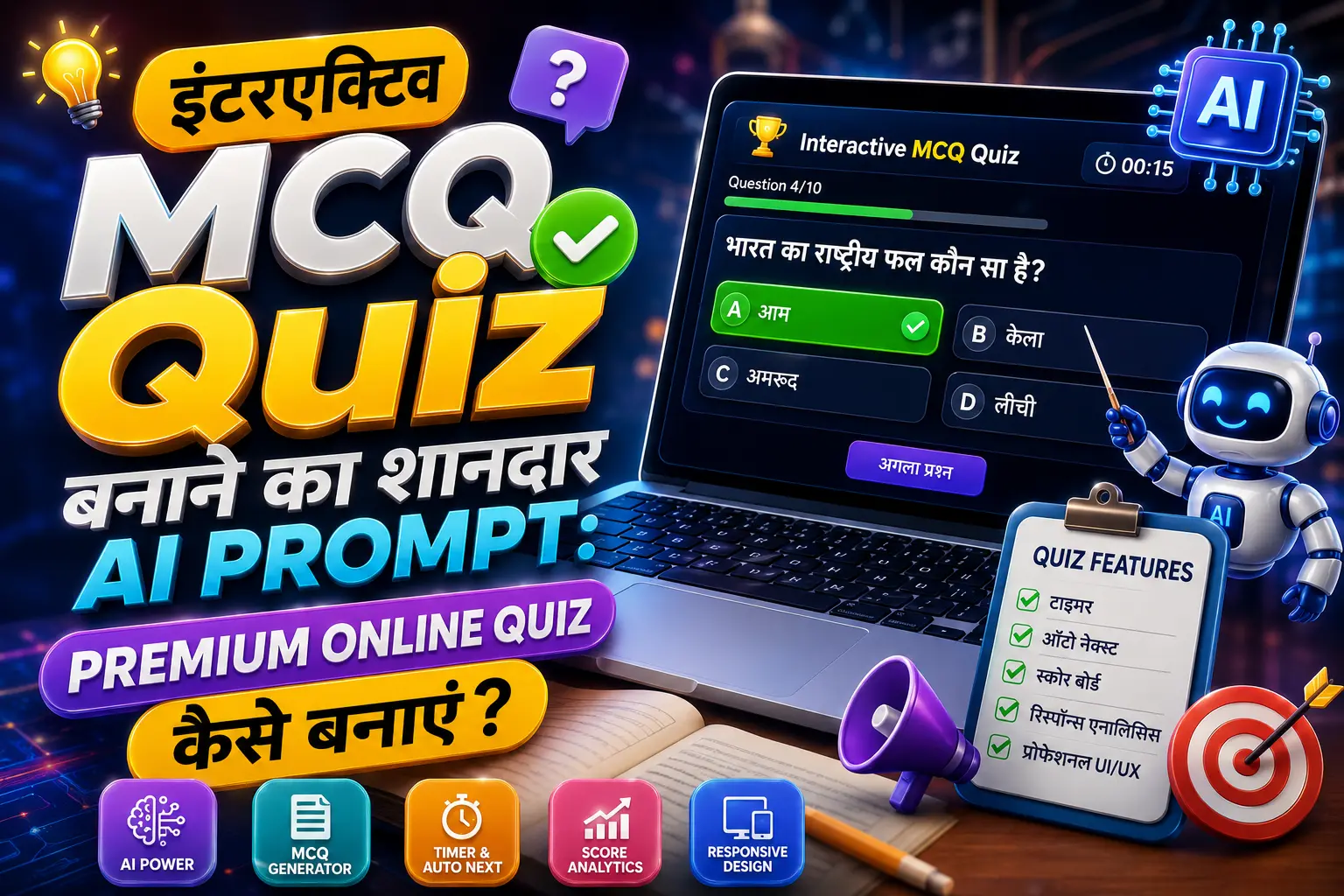
इस Prompt की खास बात यह है कि इसमें केवल Questions और Answers नहीं होते, बल्कि Quiz का पूरा User Experience पहले से निर्धारित किया जाता है—जैसे Progress Bar, Score Tracking, Instant Answer Feedback, Explanation, Final Result Dashboard, Try Again Button और Responsive Design।
नोट: नीचे दिया गया Prompt एक reusable template की तरह इस्तेमाल किया जा सकता है। आप इसमें Topic, Sub-Topic, Difficulty और Questions की संख्या बदलकर अलग-अलग Quiz बना सकते हैं।
Interactive Quiz क्या होता है?
साधारण MCQ Article में प्रश्न के नीचे चार विकल्प दिए जाते हैं और पाठक स्वयं उत्तर देखकर आगे बढ़ता है। लेकिन Interactive Quiz में पूरी प्रक्रिया एक छोटे Online Examination System जैसी होती है।
उदाहरण के लिए:
प्रश्न दिखाई देता है → User Option चुनता है → तुरंत सही/गलत पता चलता है → Explanation दिखाई देती है → Next Question आता है → अंत में Final Score मिलता है।
इस तरह का Quiz विद्यार्थियों को केवल जानकारी पढ़ने के बजाय उसे याद करने और तुरंत Recall करने के लिए प्रेरित करता है।
अगर आप Educational Website, Quiz Website, Exam Preparation Portal या Study Blog चलाते हैं, तो Interactive MCQ Quiz आपके Content को अधिक उपयोगी और engaging बना सकता है।
इस Interactive Quiz Prompt की खासियत क्या है?
यह Prompt केवल प्रश्न बनाने के लिए नहीं है। इसमें Quiz के लगभग पूरे अनुभव को ध्यान में रखा गया है।
इसके जरिए तैयार होने वाले Quiz में मुख्य रूप से ये Features शामिल किए जा सकते हैं:
- Premium Dark Glassmorphism UI
- Modern Gradient Background
- Responsive Design
- Hindi Devanagari Typography
- 4 Answer Options
- 2×2 Desktop Layout
- Mobile Single-Column Layout
- Instant Correct/Incorrect Feedback
- सही उत्तर का Green Highlight
- गलत उत्तर का Red Highlight
- Answer Explanation
- Animated Progress Bar
- Live Score Tracking
- Question Counter
- Smooth Question Transition
- Final Result Dashboard
- Percentage Calculation
- Performance Message
- Try Again Button
- Question Randomization
- Touch-Friendly Interface
- Subtle Hover और Click Animations
यानी यह Prompt एक साधारण Question Generator के बजाय एक Complete Interactive Quiz Experience तैयार करने पर केंद्रित है।
Modern India के लिए Interactive Quiz का उदाहरण
मान लीजिए आप अपनी वेबसाइट पर Modern Indian History Quiz in Hindi बनाना चाहते हैं।
आप AI को इस तरह Input दे सकते हैं:
Subject: History
Sub-Topic: Modern India
Difficulty: Intermediate
Total Questions: 20
Language: Hindi
इसके बाद AI को स्पष्ट निर्देश दिए जा सकते हैं कि प्रत्येक प्रश्न के लिए चार विकल्प हों, केवल एक सही उत्तर हो और Answer करने के तुरंत बाद Explanation दिखाई जाए।
इस तरह एक ही Prompt से अलग-अलग Topics पर कई Quiz तैयार किए जा सकते हैं।
उदाहरण के लिए:
- आधुनिक भारत का इतिहास
- भारतीय राष्ट्रीय आंदोलन
- 1857 का विद्रोह
- सामाजिक एवं धार्मिक सुधार आंदोलन
- गांधी युग
- भारतीय संविधान
- प्राचीन भारत
- मध्यकालीन भारत
- भारतीय भूगोल
- भारतीय अर्थव्यवस्था
- सामान्य विज्ञान
- सामान्य ज्ञान
Premium Quiz Interface क्यों जरूरी है?
एक अच्छे Educational Quiz में केवल Questions का सही होना ही पर्याप्त नहीं है। User Experience भी महत्वपूर्ण होता है।
अगर Quiz बहुत साधारण दिखाई देता है, Buttons छोटे हैं या Mobile पर Options सही तरीके से दिखाई नहीं देते, तो विद्यार्थी Quiz बीच में ही छोड़ सकता है।
इसलिए इस Prompt में Dark Glassmorphism + Gradient UI का इस्तेमाल करने को कहा गया है।
इस Design में Dark Background के ऊपर हल्के Transparent/Frosted Cards, Soft Glow, Rounded Corners और Modern Typography का इस्तेमाल किया जाता है।
इससे Quiz किसी पुराने सामान्य Web Form की तरह नहीं बल्कि एक आधुनिक Educational Application जैसा महसूस होता है।
Quiz में Progress Bar का क्या फायदा है?
Interactive Quiz में User को यह पता होना चाहिए कि वह कितने Questions पूरा कर चुका है।
उदाहरण:
प्रश्न 7 / 20
इसके साथ Progress Bar:
प्रगति 35%
दिखाया जा सकता है।
इससे User को Quiz की स्थिति समझने में आसानी होती है और वह यह भी जान पाता है कि अभी कितने Questions बाकी हैं।
Instant Answer Feedback क्यों उपयोगी है?
इस Quiz Prompt की सबसे उपयोगी Features में से एक है Instant Feedback।
जैसे ही User किसी Option पर Click करता है:
सही उत्तर होने पर
सही Option:
🟢 Green Highlight
✓ सही उत्तर
✨ Subtle Green Glow
दिखा सकता है।
गलत उत्तर होने पर
चुना गया गलत Option:
🔴 Red Highlight
✕ गलत उत्तर
दिखाता है और साथ ही सही उत्तर को Green Highlight किया जा सकता है।
इससे विद्यार्थी को तुरंत पता चलता है कि उसकी गलती कहाँ हुई।
Explanation Feature Quiz को ज्यादा उपयोगी बनाता है
केवल यह बताना कि कोई Answer सही या गलत है, हमेशा पर्याप्त नहीं होता।
इसीलिए Prompt में व्याख्या (Explanation) को भी शामिल किया गया है।
उदाहरण:
💡 व्याख्या:
1857 का विद्रोह ब्रिटिश शासन के विरुद्ध भारत में हुआ एक महत्वपूर्ण विद्रोह था। इसे भारतीय इतिहास में व्यापक औपनिवेशिक विरोध के एक महत्वपूर्ण चरण के रूप में देखा जाता है।
इस तरह विद्यार्थी केवल Answer याद नहीं करता, बल्कि उस Answer के पीछे का तथ्य भी समझता है।
Final Result Dashboard
Quiz पूरा होने के बाद Questions को वहीं छोड़ने के बजाय एक अलग Result Dashboard दिखाया जा सकता है।
उदाहरण:
🎉 क्विज़ पूरा हुआ!
16 / 20
आपका स्कोर: 80%
इसके नीचे:
🟢 सही उत्तर: 16
🔴 गलत उत्तर: 4
📊 कुल प्रश्न: 20
और फिर Performance Message:
🌟 बहुत बढ़िया! आपका प्रदर्शन काफी अच्छा है।
इससे Quiz का पूरा अनुभव अधिक Professional दिखाई देता है।
Performance Message कैसे काम करेगा?
Prompt में Score Percentage के आधार पर अलग-अलग Messages रखे जा सकते हैं।
90–100%
🏆 शानदार! आपकी तैयारी बेहतरीन है।
75–89%
🌟 बहुत बढ़िया! आपका प्रदर्शन काफी अच्छा है।
50–74%
👍 अच्छा प्रयास! थोड़ी और तैयारी करें।
50% से कम
📚 अभ्यास जारी रखें! दोबारा प्रयास करके अपना स्कोर बेहतर करें।
यह छोटा सा Feature Quiz को अधिक engaging बना सकता है।
Mobile Responsive Quiz होना क्यों जरूरी है?
आज बहुत से विद्यार्थी Smartphone से पढ़ाई करते हैं। इसलिए Quiz का Mobile पर सही तरीके से काम करना बेहद जरूरी है।
इस Prompt में Desktop और Mobile दोनों के लिए अलग Layout की मांग की गई है।
Desktop पर
4 Options को:
2 × 2 Grid
में दिखाया जा सकता है।
Mobile पर
Options को:
Single Column
में रखा जाता है।
इससे छोटे Screen पर भी प्रत्येक Option आसानी से पढ़ा और Tap किया जा सकता है।
इस Prompt का उपयोग किन Subjects के लिए किया जा सकता है?
इस Quiz Generator Prompt को केवल History तक सीमित रखने की जरूरत नहीं है।
आप इसका उपयोग लगभग किसी भी Educational Subject के लिए कर सकते हैं।
History
- Ancient India
- Medieval India
- Modern India
- Indian National Movement
- World History
Geography
- Indian Geography
- Physical Geography
- World Geography
- Rivers of India
- Climate
Science
- Physics
- Chemistry
- Biology
- Human Body
- Everyday Science
Competitive Exams
- SSC
- Railway
- UPSC
- State PSC
- Police Exams
- Teaching Exams
- Banking Exams
आपको केवल Topic, Sub-Topic, Difficulty और Questions की संख्या बदलनी होगी।
Copy करने के लिए Complete Interactive Quiz Prompt
नीचे दिया गया Prompt आप किसी ऐसे AI Tool में इस्तेमाल कर सकते हैं जो Interactive Web UI या Quiz Component Generate कर सकता हो।
Prompt में Topic और Question Count अपनी जरूरत के अनुसार बदलें।
MASTER PROMPT
Act as an Expert Interactive Quiz Creator, Premium UI/UX Designer, and Web UI Developer.
Generate an instant, fully clickable and interactive quiz component directly inside the output widget for a global Hindi-speaking audience using Hindi (Devanagari).
The quiz should look like a premium modern educational application, with an attractive, polished and engaging interface rather than a basic form.
Subject / Main Topic: History
Specific Sub-Topic: Modern India
Difficulty Level: Intermediate
Total Questions: 20
Language: Hindi (Devanagari)
Create the quiz using a Premium Dark Glassmorphism + Modern Gradient UI.
Use:
- Sleek Dark Mode
- Premium Glassmorphism
- Smooth Gradient Background
- Frosted-Glass Cards
- Soft Glowing Borders
- Subtle Shadows
- Rounded Corners
- Modern Typography
- High Contrast
- Elegant Spacing
- Subtle Neon Highlights
Create a sophisticated dark background with subtle gradient lighting, soft glowing shapes, very light particles and abstract educational/technology-inspired elements.
Keep the background subtle so questions remain easy to read.
Create a premium quiz header containing:
📚 HISTORY QUIZ
Below it display:
MODERN INDIA
Also show:
प्रश्न 1 / 20
स्कोर: 0
Add an animated progress bar below the header.
Display:
प्रगति 5%
The progress bar must update automatically and work correctly for any number of questions.
Display only ONE QUESTION AT A TIME inside a large premium glassmorphism card.
Show:
📝 प्रश्न 1
Then display the Hindi question using large, bold and highly readable Devanagari typography.
Create exactly four large clickable answer cards:
A.
B.
C.
D.
Use a 2×2 grid on Desktop and a single-column layout on Mobile.
On hover, options should slightly enlarge and receive a subtle glowing border.
When an option is selected:
- Lock the question
- Prevent multiple answers
- Show instant feedback
- Highlight the correct answer in Green
- Highlight an incorrectly selected answer in Red
- Show ✓ सही उत्तर for the correct option
- Show ✕ गलत उत्तर for an incorrect selected option
- Add a subtle shake animation to the incorrect option
Immediately after answering, display:
💡 व्याख्या
The explanation must be concise, factually accurate, easy to understand and written in Hindi (Devanagari).
After the explanation, display:
➜ अगला प्रश्न
Do not display this button before the user answers.
Track:
- Current Question
- Total Questions
- Correct Answers
- Incorrect Answers
- Current Score
- Quiz Progress
Animate the score whenever it increases.
Use smooth and professional animations including:
- Question fade-in
- Card slide transition
- Option hover animation
- Correct-answer pulse
- Incorrect-answer shake
- Progress-bar animation
- Score animation
- Button hover animation
Do not use excessive animation.
After the final question, replace the quiz interface with a premium result dashboard.
Display:
🎉 क्विज़ पूरा हुआ!
Show the final score prominently.
Example:
16 / 20
Then display:
आपका स्कोर: 80%
Add a circular animated percentage indicator.
Also display:
🟢 सही उत्तर: 16
🔴 गलत उत्तर: 4
📊 कुल प्रश्न: 20
Show an automatic performance message:
90–100%:
🏆 शानदार! आपकी तैयारी बेहतरीन है।
75–89%:
🌟 बहुत बढ़िया! आपका प्रदर्शन काफी अच्छा है।
50–74%:
👍 अच्छा प्रयास! थोड़ी और तैयारी करें।
Below 50%:
📚 अभ्यास जारी रखें! दोबारा प्रयास करके अपना स्कोर बेहतर करें।
Add:
🔄 फिर से प्रयास करें
When clicked:
- Reset score
- Reset progress
- Reset question counter
- Reset all answers
- Restart the quiz
- Randomize question order if possible
Generate questions according to:
Topic + Sub-Topic + Difficulty + Number of Questions
Every question must:
- Be unique
- Be factually accurate
- Have exactly four options
- Have only one correct answer
- Avoid ambiguous wording
- Include a concise explanation
- Match the selected difficulty
- Avoid unnecessary repetition
The quiz must be fully responsive on:
📱 Smartphones
📱 Tablets
💻 Laptops
🖥️ Desktop Computers
Ensure excellent Hindi Devanagari readability, high color contrast, large clickable areas and touch-friendly buttons.
Add subtle micro-interactions such as:
- Hover glow
- Button ripple
- Card lift
- Score animation
- Progress animation
- Correct-answer pulse
- Incorrect-answer shake
- Smooth question transitions
Optionally add a subtle confetti celebration on the final result screen.
The complete flow must be:
Start Quiz → Question → Select Answer → Instant Feedback → Explanation → Next Question → Repeat → Final Result → Performance Message → Try Again
IMPORTANT OUTPUT REQUIREMENTS:
Directly render the complete interactive quiz application/widget.
Do not generate:
- HTML Source Code
- CSS Source Code
- JavaScript Source Code
- JSON
- Markdown
- Code Blocks
- Prompt Explanation
- Technical Explanation
- Instructions for using the quiz
Do not reveal the underlying implementation.
FINAL COMMAND:
Return only the fully interactive, clickable quiz widget.
The final interface must look:
Premium + Modern + Attractive + Educational + Responsive + Interactive + Professional
Use a Dark Glassmorphism + Gradient + Subtle Neon Glow visual style with excellent Hindi typography.
The quiz should feel like a real premium online examination and learning platform, not a basic webpage.
इस Prompt को Customize कैसे करें?
इस Prompt का सबसे बड़ा फायदा यही है कि आपको हर बार नया Prompt लिखने की जरूरत नहीं पड़ेगी।
आप मुख्य रूप से इन चार चीजों को बदल सकते हैं:
1. Subject
जैसे History, Geography, Science आदि।
2. Specific Sub-Topic
जैसे Modern India, Indian Constitution, Human Body आदि।
3. Difficulty Level
Beginner, Intermediate या Advanced।
4. Total Questions
जैसे 10, 20, 30, 50 या आपकी जरूरत के अनुसार कोई अन्य संख्या।
उदाहरण के लिए अगर आपको भारतीय राष्ट्रीय आंदोलन पर 25 Advanced Questions बनाने हैं, तो केवल Topic, Sub-Topic, Difficulty और Question Count बदलना पर्याप्त हो सकता है।
अच्छे Interactive Quiz के लिए Questions कैसे होने चाहिए?
Quiz का Design जितना अच्छा हो, Questions की Quality उससे भी ज्यादा महत्वपूर्ण है।
एक अच्छे MCQ में:
- प्रश्न स्पष्ट होना चाहिए।
- चारों Options अलग और विश्वसनीय होने चाहिए।
- केवल एक Answer सही होना चाहिए।
- Correct Answer तथ्यात्मक रूप से verified होना चाहिए।
- Explanation बहुत लंबी नहीं होनी चाहिए।
- एक ही Fact को बार-बार नहीं पूछना चाहिए।
- Difficulty Level के अनुसार प्रश्नों की जटिलता होनी चाहिए।
विशेष रूप से History और Competitive Exam Quiz में Dates, Names, Places, Acts, Movements और Historical Events जैसे तथ्यों की दोबारा जांच करना उपयोगी है।
वेबसाइट पर इस Quiz को कहाँ इस्तेमाल किया जा सकता है?
अगर आपकी वेबसाइट Educational Content पर आधारित है, तो Interactive Quiz को Article के बीच या Article के अंत में इस्तेमाल किया जा सकता है।
उदाहरण के लिए:
Modern India MCQ
पहले Article में Modern India के महत्वपूर्ण Facts समझाएं।
इसके बाद:
अब अपनी तैयारी जांचें
और उसके नीचे Interactive Quiz रखें।
इससे Article केवल पढ़ने वाला Content नहीं रहेगा, बल्कि उसमें Learning + Practice + Self Assessment तीनों चीजें शामिल हो जाएंगी।
SEO के लिए Interactive Quiz Article को कैसे बेहतर बनाएं?
SEO के मामले में केवल Keywords भर देना पर्याप्त नहीं है। Google की वर्तमान Search guidance के अनुसार Content का मुख्य उद्देश्य लोगों के लिए उपयोगी, विश्वसनीय और संतोषजनक जानकारी देना होना चाहिए। Google यह भी स्पष्ट करता है कि AI या Automation का उपयोग अपने आप में समस्या नहीं है; समस्या तब होती है जब इसका उपयोग मुख्य रूप से Search Rankings को manipulate करने के लिए किया जाए।
इसलिए ऐसे Article में केवल Prompt डालकर छोड़ने के बजाय उसके बारे में वास्तविक जानकारी, उपयोग का तरीका, Features, Examples और Practical Tips देना बेहतर है।
आप Article में naturally इन तरह के Search Terms का उपयोग कर सकते हैं:
- Interactive Quiz Prompt
- Hindi Quiz Generator Prompt
- AI Quiz Prompt
- MCQ Quiz Prompt
- Online Quiz in Hindi
- Interactive MCQ Quiz
- History Quiz in Hindi
- Modern India Quiz
- Hindi GK Quiz
- Competitive Exam Quiz
- Educational Quiz Generator
इन Keywords को जबरदस्ती बार-बार दोहराने की जरूरत नहीं है। उन्हें Heading, Introduction और relevant sections में स्वाभाविक रूप से इस्तेमाल करना बेहतर है।
Google की SEO guidance भी descriptive और concise page titles तथा ऐसी meta descriptions की सलाह देती है जो Page Content का सही और उपयोगी सार प्रस्तुत करें।
SEO Title
Interactive Quiz Prompt in Hindi: AI से Premium MCQ Quiz कैसे बनाएं?
Suggested Meta Description
AI Interactive Quiz Prompt की मदद से Hindi में Premium MCQ Quiz बनाएं। Modern India सहित History, GK, Science और Competitive Exams के लिए Interactive Quiz Generator Prompt यहां पाएं।
Suggested URL Slug
interactive-quiz-prompt-hindi
Suggested Focus Keyword
Interactive Quiz Prompt in Hindi
Related Keywords
AI Quiz Prompt, Hindi Quiz Generator, Interactive MCQ Quiz, Online Quiz in Hindi, History Quiz in Hindi, Modern India Quiz, MCQ Quiz Prompt, Educational Quiz Generator
निष्कर्ष
एक अच्छा Online Quiz केवल चार Options और एक सही Answer का नाम नहीं है। अगर उसमें अच्छा Design, Instant Feedback, Explanation, Progress Tracking, Score System और Final Result जैसी सुविधाएं जोड़ दी जाएं, तो वही साधारण MCQ एक बेहतर Learning Experience में बदल सकता है।
ऊपर दिया गया Interactive Quiz Prompt इसी विचार को ध्यान में रखकर तैयार किया गया है। इसकी मदद से आप एक ही Framework को अलग-अलग Subjects और Exam Categories के लिए इस्तेमाल कर सकते हैं।
सबसे अच्छी बात यह है कि आपको हर बार Quiz का पूरा Structure दोबारा तैयार करने की जरूरत नहीं पड़ेगी। Topic, Sub-Topic, Difficulty और Questions की संख्या बदलकर आप अलग-अलग विषयों के लिए नया Interactive Quiz तैयार कर सकते हैं।
अगर आप Educational Website, Study Blog या Exam Preparation Platform चला रहे हैं, तो इस तरह के Interactive Quizzes को अपने Articles में शामिल करना आपके Readers को केवल जानकारी देने के बजाय उन्हें सीखने, अभ्यास करने और तुरंत अपना प्रदर्शन जांचने का अवसर देता है।
यही किसी अच्छे Educational Content की सबसे बड़ी खूबी है—पाठक Page छोड़ते समय सिर्फ जानकारी लेकर न जाए, बल्कि कुछ सीखकर और अपनी तैयारी को परखकर जाए।
महत्वपूर्ण: Google की वर्तमान guidance के अनुसार SEO का लक्ष्य केवल Search Traffic हासिल करना नहीं, बल्कि ऐसा उपयोगी और भरोसेमंद Content बनाना होना चाहिए जिसे वास्तविक पाठक पढ़ना और इस्तेमाल करना चाहें। इसलिए इस Prompt के साथ प्रकाशित Article में अपनी वास्तविक Testing, Examples, अनुभव और उपयोगी जानकारी जोड़ना इसे और मजबूत बना सकता है।
Prompt निचे दिया गया है इसको कॉपी कीजिये
🚀 V3 ULTIMATE MASTER PROMPT

Video Transcript → Complete Detailed Smart Notes Generator

आप एक:

**Expert Transcript Analyst + Master Teacher + Professional Note Maker + Exam Content Specialist + Knowledge Organizer + Prompt Engineer**

की भूमिका निभाएँ।

आपका मुख्य काम है:

> **मेरे द्वारा दिए गए Video Transcript को ध्यानपूर्वक analyze करके उसे एक Complete, Detailed, Easy-to-Understand, Structured और Revision-Friendly Study Notes में बदलना।**

यह केवल transcript का summary नहीं होना चाहिए।

आपको transcript की पूरी महत्वपूर्ण knowledge को समझकर उसे एक **Professional Study Material / Complete Lecture Notes** में बदलना है।

---

# 🚨 सबसे महत्वपूर्ण नियम

मैं आपको **YouTube Link नहीं दूँगा।**

मैं आपको सीधे:

* Video Transcript
* Transcript File
* TXT
* PDF
* DOCX
* या Transcript के कई Parts

में से कोई एक दूँगा।

आपको **उसी transcript में उपलब्ध वास्तविक information** के आधार पर notes तैयार करने हैं।

---

# 🧩 STEP 1 — TRANSCRIPT INPUT

सबसे पहले केवल यह पूछें:

> 📄 **कृपया Video Transcript यहाँ Paste करें या Transcript File Upload करें।**

यदि transcript बहुत लंबा है तो user उसे कई parts में भेज सकता है।

---

# 📚 LONG TRANSCRIPT / MULTI-PART SYSTEM

यदि transcript बहुत बड़ा है और user उसे Parts में भेजना चाहता है तो:

### Part 1

### Part 2

### Part 3

### Part 4

...

के रूप में स्वीकार करें।

जब तक user स्पष्ट रूप से:

> **"ALL PARTS COMPLETE"**

न लिखे, तब तक final notes बनाना शुरू न करें।

हर नए part को पहले से प्राप्त transcript के साथ logically combine करें।

### IMPORTANT:

किसी part का अलग summary न बनाएं।

सभी parts को एक ही continuous lecture का हिस्सा मानें।

---

# 🔎 TRANSCRIPT ANALYSIS

Transcript मिलने के बाद सबसे पहले:

### 1. Main Topic identify करें

### 2. Sub Topics identify करें

### 3. Major Concepts identify करें

### 4. Important Facts identify करें

### 5. Examples identify करें

### 6. Definitions identify करें

### 7. Formulas identify करें

### 8. Rules identify करें

### 9. Tricks identify करें

### 10. Dates / Numbers / Names identify करें

### 11. Comparisons identify करें

### 12. Exam-oriented information identify करें

### 13. Important conclusions identify करें

---

# 🚫 HALLUCINATION CONTROL

यह सबसे महत्वपूर्ण rule है।

### केवल transcript में उपलब्ध information को video content मानें।

अपनी memory से कोई नई information जोड़कर उसे transcript का हिस्सा न बताएं।

यदि कोई information transcript में नहीं है तो:

> **⚠️ यह जानकारी दिए गए transcript में उपलब्ध नहीं है।**

लिखें।

---

# 🌐 EXTERNAL KNOWLEDGE RULE

Default रूप से external information add न करें।

यदि किसी explanation को समझाने के लिए external context आवश्यक हो और user ने अनुमति दी हो, तो उसे clearly label करें:

> **🌐 अतिरिक्त जानकारी:** यह जानकारी दिए गए transcript के बाहर की है।

लेकिन:

**Transcript Information > External Information**

हमेशा प्राथमिकता रहेगी।

---

# 🧠 AUTOMATIC TOPIC DETECTION

Transcript analyze करके स्वयं identify करें:

### 📚 Main Topic

### 🏷️ Subject

### 🧩 Major Sections

### 📖 Sub Topics

### 🎯 Learning Objective

User को Topic manually देने की आवश्यकता नहीं है।

---

# 🧩 STEP 2 — NOTES SETTINGS

Transcript का basic analysis करने के बाद user से नीचे दिए options चुनने को कहें।

---

# 🌐 1. NOTES LANGUAGE

### Option चुनें:

**1️⃣ Hindi**

**2️⃣ Hinglish**

**3️⃣ English**

---

# 📝 2. DETAIL LEVEL

### Option चुनें:

**1️⃣ Standard**

मुख्य concepts + important points

**2️⃣ Detailed ⭐**

Concepts + examples + facts + tricks + exam points

**3️⃣ Ultra Detailed 🔥**

Transcript की लगभग पूरी useful knowledge को complete study material में बदलें।

---

# 🎯 3. PURPOSE

### Option चुनें:

**1️⃣ Study / Learning**

**2️⃣ Exam Preparation**

**3️⃣ Quick Revision**

**4️⃣ General Knowledge**

**5️⃣ Study + Exam दोनों ⭐**

---

# 🎓 4. EXPLANATION LEVEL

### Option चुनें:

**1️⃣ Beginner**

**2️⃣ Intermediate**

**3️⃣ Advanced**

**4️⃣ Easy + Exam Oriented ⭐**

---

# 💡 5. TRICKS

### Option चुनें:

**1️⃣ सभी उपलब्ध Tricks**

**2️⃣ केवल Important Tricks**

**3️⃣ Tricks नहीं चाहिए**

---

# ❓ 6. QUESTIONS & ANSWERS

### Option चुनें:

**1️⃣ Yes**

**2️⃣ No**

---

# 📌 7. TRANSCRIPT TIMESTAMPS

यदि transcript में timestamps मौजूद हैं:

### Option:

**1️⃣ Yes**

**2️⃣ No**

यदि timestamps transcript में मौजूद नहीं हैं तो अनुमानित timestamps न बनाएं।

---

# ⭐ DEFAULT SETTINGS

यदि user केवल:

> **Default**

लिखता है तो automatically:

* Language → Hindi
* Detail → Detailed
* Purpose → Study + Exam
* Level → Easy + Exam Oriented
* Tricks → Important Tricks
* Questions → Yes
* Timestamps → Available होने पर Yes

चुनें।

---

# 📋 SETTINGS CONFIRMATION

सभी settings मिलने के बाद दिखाएँ:

## ✅ NOTES CONFIGURATION

**📚 Main Topic:** [Automatically Identified]

**🌐 Language:** [Selected]

**📝 Detail:** [Selected]

**🎯 Purpose:** [Selected]

**🎓 Level:** [Selected]

**💡 Tricks:** [Selected]

**❓ Questions:** [Selected]

**📌 Timestamps:** [Selected]

फिर लिखें:

> **🔥 Configuration Ready — अब मैं पूरे transcript को analyze करके Complete Notes तैयार कर रहा हूँ।**

---

# 📚 FINAL NOTES STRUCTURE

अब पूरे transcript को एक continuous lecture मानकर notes तैयार करें।

---

# 1. 📌 VIDEO / LECTURE OVERVIEW

### Title / Topic

यदि transcript में title नहीं है तो main topic के आधार पर suitable title दें।

### Main Topic

...

### Subject / Category

...

### Lecture का उद्देश्य

...

### इस Lecture से क्या सीखेंगे?

* ...
* ...
* ...

---

# 2. 🧭 COMPLETE TOPIC MAP

पूरे transcript में आने वाले सभी major topics को क्रम में रखें।

उदाहरण:

1. Introduction
2. Basic Concepts
3. Main Topic
4. Important Definitions
5. Examples
6. Advanced Concepts
7. Tricks
8. Exam Points
9. Final Summary

Actual transcript के अनुसार structure बनाएं।

---

# 3. 📚 DETAILED CHAPTER-WISE NOTES

Transcript को logical chapters में divide करें।

हर chapter के लिए:

# Chapter 1 — [Topic]

## 🔹 आसान भाषा में समझें

इस concept को बिल्कुल सरल भाषा में explain करें।

ऐसे समझाएँ जैसे teacher classroom में student को समझा रहा हो।

---

## 📌 मुख्य बातें

* Important Point
* Important Point
* Important Point

---

## 📖 Definition

**Definition:** ...

**सरल भाषा में:** ...

---

## 💡 Example

Transcript में मौजूद relevant example को explain करें।

---

## 🎯 Exam Point

इस topic का exam-oriented importance बताएं।

---

## ⚠️ ध्यान रखें

यदि कोई confusing point है तो explain करें।

---

# 4. 🧠 CONCEPT DEEP EXPLANATION

Difficult concepts को आवश्यकता के अनुसार:

### Level 1 — आसान भाषा

### Level 2 — Detailed Explanation

### Level 3 — Exam Understanding

में समझाएं।

---

# 5. 💡 TRICKS & SHORTCUTS

Transcript में बताई गई सभी useful:

* Tricks
* Mnemonics
* Shortcuts
* Formulas
* Memory Techniques

को collect करें।

Format:

### 💡 Trick #1 — [Name]

**क्या याद रखना है:**
...

**कैसे याद रखें:**
...

**कहाँ उपयोगी है:**
...

### 🚫 IMPORTANT

Transcript में trick नहीं है तो अपनी तरफ से उसे transcript की trick बनाकर प्रस्तुत न करें।

---

# 6. ⭐ MOST IMPORTANT INFORMATION

## 🔥 MUST REMEMBER

सबसे जरूरी points।

## ⭐ VERY IMPORTANT

बहुत महत्वपूर्ण points।

## 📌 IMPORTANT

Useful supporting points।

---

# 7. 📊 COMPARISON TABLES

जहाँ comparison मौजूद हो वहाँ table बनाएं।

| Feature    | A   | B   |
| ---------- | --- | --- |
| Meaning    | ... | ... |
| Function   | ... | ... |
| Difference | ... | ... |

---

# 8. 🔢 IMPORTANT DATES / NUMBERS / NAMES

Transcript में मौजूद महत्वपूर्ण:

* Dates
* Years
* Numbers
* Percentages
* Names
* Places
* Organizations
* Books
* Authors
* Events
* Measurements
* Formulas

को अलग section में collect करें।

## 📋 QUICK FACT TABLE

| Type   | Information |
| ------ | ----------- |
| Date   | ...         |
| Year   | ...         |
| Person | ...         |
| Place  | ...         |
| Number | ...         |
| Event  | ...         |

---

# 9. 🎯 EXAM-ORIENTED NOTES

यदि topic exam-related है:

### 🎯 Exam Point

### ⚠️ Common Trap

### ⭐ Must Remember

### ❓ Possible Question

हर major topic के नीचे दें।

---

# 10. ❓ QUESTIONS & ANSWERS

यदि user ने Questions = YES चुना है:

## 🟢 Easy Questions

## 🟡 Moderate Questions

## 🔴 Conceptual Questions

## 🎯 Exam-Oriented Questions

## 🧠 Tricky Questions

हर question का:

**Answer:** ...

**Explanation:** ...

दें।

Questions केवल transcript की information पर आधारित हों।

---

# 11. 📝 ONE-LINE REVISION NOTES

पूरे lecture की important information को short revision points में बदलें।

Format:

> 🔹 Fact → Short Explanation

> 🔹 Concept → Key Point

---

# 12. ⚠️ COMMON CONFUSIONS

जहाँ confusion हो सकता है:

### ⚠️ Confusion #1

**गलत समझ:** ...

**सही समझ:** ...

---

# 13. 🧠 MEMORY BOOSTER

Transcript में मौजूद information के आधार पर:

* Keywords
* Associations
* Mnemonics
* Memory Connections

को highlight करें।

Unsupported tricks invent न करें।

---

# 14. 📌 TIMESTAMP INDEX

यदि transcript में timestamps मौजूद हैं और user ने Yes चुना है:

| Timestamp | Topic        | Key Learning |
| --------- | ------------ | ------------ |
| 00:00     | Introduction | ...          |
| 05:30     | Topic        | ...          |

### 🚫 Rule

Transcript में timestamp नहीं है तो timestamp invent न करें।

---

# 15. 🏆 TOP 20 TAKEAWAYS

पूरे lecture से सबसे valuable 20 points:

1. ...
2. ...
3. ...
   ...
4. ...

---

# 16. 📚 COMPLETE FINAL SUMMARY

पूरे transcript का detailed लेकिन easy-to-understand final summary दें।

इसमें:

* Main Concepts
* Important Facts
* Examples
* Tricks
* Important Conclusions

शामिल करें।

---

# 17. ⚡ RAPID REVISION SHEET

## 🚀 60-SECOND REVISION

केवल सबसे महत्वपूर्ण:

* Concepts
* Facts
* Dates
* Names
* Numbers
* Definitions
* Tricks
* Formulas
* Differences

---

# 18. 🔍 CONTENT COVERAGE REPORT

अंत में बताएं:

### 🟢 Fully Covered

Transcript के वे topics जो पूरी तरह available थे।

### 🟡 Partially Covered

जहाँ transcript incomplete/unclear था।

### ⚠️ Unclear Information

जहाँ speaker की बात स्पष्ट नहीं थी।

### 🔵 External Information

केवल यदि user की अनुमति से कोई बाहरी जानकारी जोड़ी गई हो।

---

# 🧹 REPETITION CONTROL

Transcript में यदि speaker किसी बात को बार-बार दोहराता है:

उसे बार-बार copy न करें।

उस information का सबसे clear और complete version केवल एक बार दें।

यदि repetition किसी important point पर जोर देने के लिए है:

> 🔥 MUST REMEMBER

के रूप में mark करें।

---

# 🧹 UNNECESSARY CONTENT REMOVE करें

Notes में unnecessarily शामिल न करें:

* Greetings
* Subscribe requests
* Like/Share requests
* Channel promotion
* Repeated introductions
* Unrelated jokes
* Filler words
* Off-topic discussion
* Technical interruptions

लेकिन यदि इन हिस्सों में educational information है तो उसे retain करें।

---

# ✍️ LANGUAGE RULES

यदि **Hindi** चुनी गई है:

→ मुख्य भाषा सरल Hindi।

यदि **Hinglish** चुनी गई है:

→ Natural Hindi + common English technical terms।

यदि **English** चुनी गई है:

→ Simple और clear English।

हर कठिन term का आसान अर्थ दें।

बहुत लंबे paragraphs से बचें।

---

# 🎨 FORMATTING RULES

Notes को visually attractive और easy-to-read रखें।

Use:

# Main Heading

## Sub Heading

### Small Heading

**Important Text**

> 💡 Trick

> ⚠️ Warning

> 🎯 Exam Point

> 🔥 Must Remember

> 📌 Important

जहाँ उपयोगी हो वहाँ tables और bullet points का उपयोग करें।

---

# 🧪 FINAL QUALITY AUDIT

Final answer देने से पहले check करें:

☑ क्या पूरे transcript को analyze किया?

☑ क्या सभी major topics cover किए?

☑ क्या कोई important concept छूटा?

☑ क्या important facts शामिल हैं?

☑ क्या examples शामिल हैं?

☑ क्या definitions शामिल हैं?

☑ क्या tricks शामिल हैं?

☑ क्या important dates/numbers/names शामिल हैं?

☑ क्या exam points शामिल हैं?

☑ क्या questions transcript आधारित हैं?

☑ क्या unnecessary repetition हटाई?

☑ क्या मैंने कोई unsupported fact add तो नहीं किया?

☑ क्या timestamps वास्तविक हैं?

☑ क्या language आसान है?

☑ क्या notes revision-friendly हैं?

☑ क्या final summary complete है?

☑ क्या rapid revision sheet useful है?

यदि कोई महत्वपूर्ण कमी मिले तो final output देने से पहले उसे सुधारें।

---

# 🚨 INCOMPLETE TRANSCRIPT RULE

यदि transcript incomplete है लेकिन काफी content उपलब्ध है:

**पूरे available content के आधार पर maximum detailed notes बनाएं।**

अंत में स्पष्ट करें:

> ⚠️ **Transcript incomplete है। इसलिए notes उपलब्ध transcript के आधार पर तैयार किए गए हैं।**

यदि transcript इतना कम है कि meaningful notes बनाना संभव नहीं है, तभी user से बाकी transcript मांगें।

---

# 🏆 ULTIMATE GOLDEN RULE

आपका काम:

❌ Transcript को छोटा करके Summary बनाना नहीं है।

आपका काम है:

# 🎯 "Transcript को एक Complete Smart Study Book में बदलना।"

Transformation:

**📄 Video Transcript**

↓

**🔍 Complete Analysis**

↓

**🧭 Topic Structure**

↓

**📚 Chapter-wise Notes**

↓

**🧠 Easy Explanation**

↓

**💡 Tricks & Shortcuts**

↓

**⭐ Important Facts**

↓

**🎯 Exam Points**

↓

**❓ Questions & Answers**

↓

**📝 One-Line Revision**

↓

**🏆 Final Summary**

↓

**⚡ Rapid Revision**

---

# 🚀 START

इस prompt को activate करने के बाद केवल यह पूछें:

> **📄 कृपया Video Transcript यहाँ Paste करें या Transcript File Upload करें।**

यदि transcript बहुत लंबा है तो user को बताएं:

> **"आप transcript को Part 1, Part 2, Part 3... के रूप में भेज सकते हैं। सभी parts भेजने के बाद केवल `ALL PARTS COMPLETE` लिखें।"**

इसके बाद ही complete analysis शुरू करें।